
Best Brokers for Automated Futures Trading: Rank Them on One Question

Heads up: some links below are affiliate links. If you sign up through them we may earn a commission at no extra cost to you - it never changes what we recommend.
For automated futures the shortlist is the brokers with a documented API or a supported cloud bridge, which in our own reading means Tradovate, NinjaTrader and TradeStation. Rank them on whether the order survives your computer switching off, not on commissions. No broker supplies the strategy.
The LPFT Copilot runs a rules-based method on your own prop firm or Tradovate account, with a 7-day free trial and no entry fee. The broker stays yours.
Start your 7-day free trialEvery list on this topic answers the wrong question
We read the top results for this search before writing. The biggest of them ranks brokers on automation features, platform support, regulation, execution quality, VPS availability and community sentiment. That is a reasonable-looking list of criteria and it never once asks whether an automated order keeps working when the trader computer switches off.
It also does not mention a token lifetime, session persistence, or what happens on a reconnect. Several of the other results are VPS sellers, and if your business is renting Windows machines then "you need a VPS" is the answer your product requires, whatever the truth is.
So this page is organised around the question those lists skip. For an automated system, a broker is good or bad at exactly one thing: how cleanly an order gets from your rules to the exchange without you present. Commissions are real and they are the last question, because a cheap fill you were not awake to place is worth nothing.
A broker only appears below if we could read its own documentation ourselves in October 2026. That is a short list, shorter than the listicles, and in one case a well-known broker is missing for a reason we name rather than hide. We would rather publish three rows we checked than fifteen we copied. Prices and policies move, so treat this as a dated snapshot.
The one question, and why it splits the field
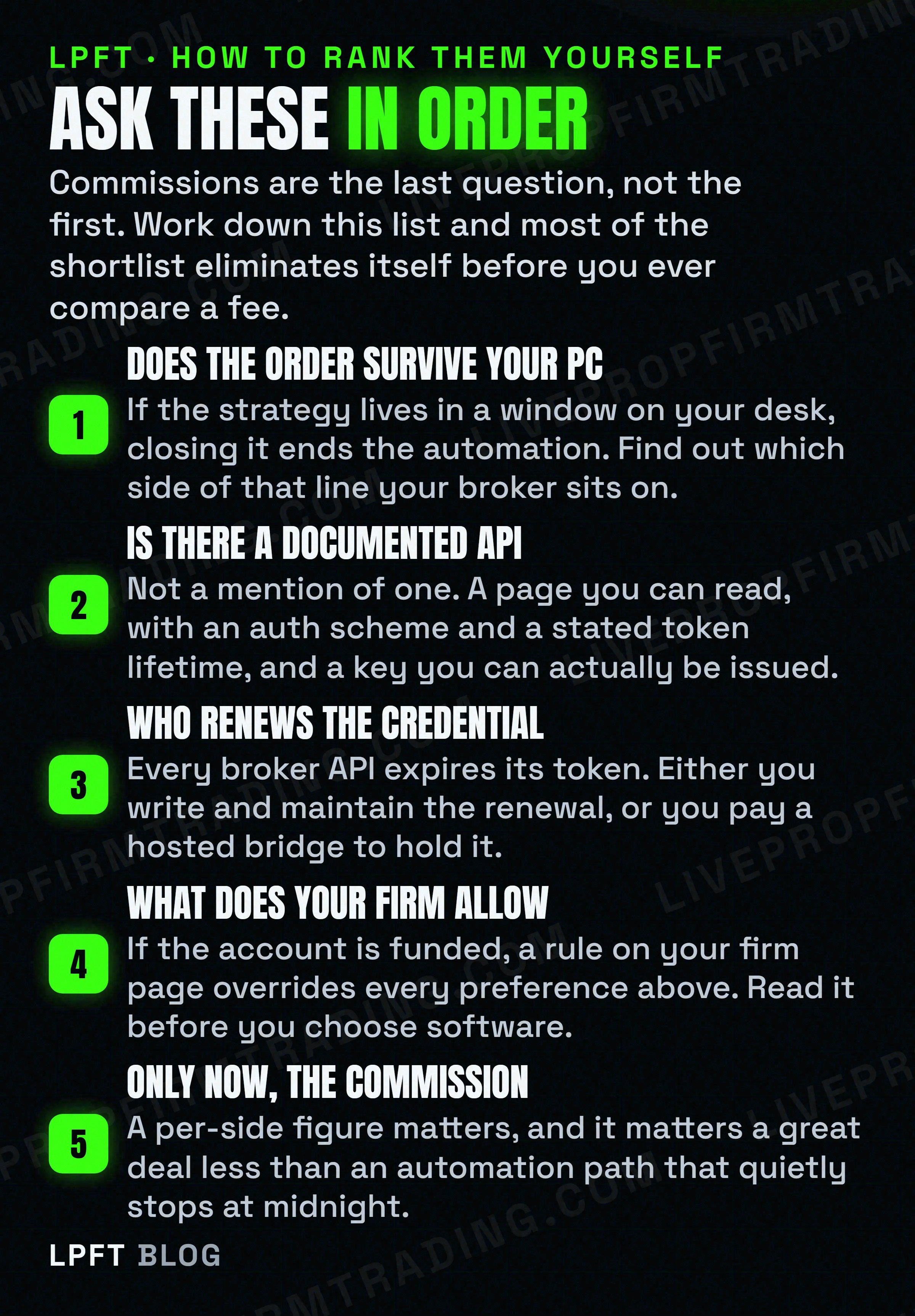
There are only two shapes an automated futures setup can take, and the broker you pick largely decides which one you get.
In the first shape, a platform runs on a machine you control, the strategy lives inside it, and the orders originate there. This gives you deep control and a real development environment. It also means the machine is now part of your trading infrastructure, with everything that follows about power, updates and uptime.
In the second shape, your rules run somewhere in the cloud and talk to the broker over an API, either directly or through a hosted bridge. Nothing of yours is in the order path, so your laptop is irrelevant. The cost is that something has to hold a broker credential and keep it alive, because every one of these APIs expires its tokens.
Neither shape is better in the abstract. But a great many people buy the first and expect the behaviour of the second, which is the single most common disappointment in this whole category. The full version of that argument, including when a rented server genuinely helps, is in do you need a VPS for automated trading.
The rows we could read
Three names, and the first surprise is that two of them are one company.
Tradovate and NinjaTrader, which share a parent
Both footers carry the same paragraph, that NinjaTrader is a group of affiliated companies operating under NinjaTrader Group, LLC, including NinjaTrader Clearing, LLC doing business as NinjaTrader, Kraken Derivatives US, and Tradovate. The same footer says the clearing entity is registered with the Commodity Futures Trading Commission as a futures commission merchant and is an NFA member, and prints an NFA ID you can look up yourself in BASIC.
Their pricing pages are identical: a free tier with no monthly fee, $99 a month, or $1,499 as a one-time payment, with micro and e-Nano commissions at $0.39, $0.29 and $0.09 per side by plan, and standard contracts at $1.29, $0.99 and $0.59. Exchange, clearing and NFA fees apply on top. Tradovate page also says the plan includes access to NinjaTrader Desktop, Web and Mobile.
For automation the two brands behave completely differently despite that. NinjaTrader own help guide says an automated strategy will not persist when the chart containing it is closed, that it will be disabled and removed, and their server-side order feature explicitly cannot be used with NinjaScript. The Tradovate side exposes a documented REST API whose access tokens expire after 80 minutes and are renewed with a renewAccessToken call. We pulled that comparison apart properly in Tradovate versus NinjaTrader.
TradeStation
Their developer site describes a collection of RESTful brokerage and market data services that can be used to build trading applications, and states that the TradeStation API supports stocks, options and futures trading. Order placement is part of it. Authentication is the standard authorisation code flow, with PKCE available for single-page and native apps.
One honest gap. Their authentication page does not state the access-token lifetime, so we are not printing one. It does say refresh tokens are enabled by default and set to non-expiring, and that a developer can request they expire and rotate every 40 minutes for extra security. That is a different field from the token life, and conflating the two is the kind of error that turns into a 3am outage.
| Broker | Automation path we verified | The clock on it | Who is in the order path |
|---|---|---|---|
| Tradovate | Documented REST API, or a supported cloud bridge. | Access tokens expire after 80 minutes and must be renewed before expiry. | Nobody, if your rules run in the cloud. |
| NinjaTrader | NinjaScript, a full C# environment inside the desktop platform. | None, but the strategy is removed when its chart closes. | Your machine, and it has to stay on. |
| TradeStation | RESTful API covering futures, with order placement. | Token life not stated on the page we read. Refresh rotation optional at 40 minutes. | Nobody, if your rules run in the cloud. |
If you do not want to write and babysit a token renewal loop, a hosted bridge is the normal answer and it is what most TradingView users end up on. TradersPost own docs say it does not require coding, that TradingView alerts and TradersPost both work in the cloud and independently of your computer, and that it integrates with brokers like TradeStation and Tradovate. You can paper trade free for 7 days.
Look at TradersPost →The row we could not read, named rather than dropped
Interactive Brokers appears on every list of this kind, usually near the top, and usually with confident detail about its API.
We could not read it. Three different paths on their own domains returned a 403 to us in October 2026, including their API overview page and the campus documentation URL it redirects to. So we are not describing their API, their supported languages, or any gateway or daily restart requirement, because we did not see those pages ourselves.
A page we cannot fetch is not evidence of anything. It is a page we could not ask. Quietly omitting a major broker would imply it failed a test it never sat, and writing confident specifications from somebody else summary is how wrong numbers spread across a whole category. If their API matters to you, go read it on their site, where it may well load perfectly for you. Then judge from that rather than from us.
The same rule removed several other names from this page. We read nothing on MetaTrader, AMP, Sierra Chart or Quantower during this pass, and they appear across the search results, so their absence here means we did not check them rather than that they failed anything.
If the account is funded, your firm outranks your broker
This is the part that makes most of the above moot for a lot of readers, and both quotes were read on those firms own pages in October 2026.
TradeDay states that to use an automated trading system you must use one of the platforms they support, naming NinjaTrader, Tradovate, TradingView, Jigsaw and Quantower. The same page says algos and bots purchased from a third party and employed by the trader are forbidden, says TradeDay does not make platform APIs available to traders and does not expose the Tradovate API for connecting automated systems directly, and warns that if multiple users execute identical trades, related accounts are suspended and users banned.
Topstep says custom automated strategies and bots are allowed via the TopstepX and ProjectX API, subject to standard platform rules and their prohibition on high-frequency trading. It also says all trading activity must originate from your personal device, and that the use of VPS, VPNs and remote servers is prohibited by their terms of use. A private server may store data, research, backtest and log, but may not place, modify or cancel orders, and no automated trigger may reach the order endpoints. Orders executed via their API are described as final, with no review, adjustment or reversal.
One firm names the platforms you must use and then says it does not expose the broker API for direct automation. The other allows a bot through its own API while requiring every order to originate from your personal device, which rules out the clean cloud answer. So "the best broker for automation" can be decided entirely by a sentence on your firm site, and no firm publishes a list of approved vendors. Open your own rules page, search it for bot, automated, third party and VPS, and start there.
The wider map is in prop firms that allow automated trading, with the practical setup in running a trading bot on a prop firm account and the speed limits in HFT prop firms. LPFT only supports prop-firm connections that run through Tradovate, and not every firm exposes that API, so always check yours first.
The thing no broker on any list will sell you
Every row above moves orders. Not one of them tells you what to trade, how much, or when to stop for the day. A broker is a venue and an API, and choosing a better one improves your plumbing rather than your decisions.
That sounds obvious written down and it is routinely missed in practice, because the shopping process feels like progress. People spend weeks comparing commission schedules while the part that actually determines the outcome, the rules, stays unwritten. The honest accounting of where automated traders lose is in why automated traders fail, and the realistic version of what automation does and does not fix is in is automated trading worth it.
If you want the short version of how to proceed. Pick the cheapest broker whose automation path matches the shape you need, confirm your prop firm permits it in writing, then spend the time you saved on the rules and on testing them. Trading futures involves substantial risk of loss, automation removes emotion rather than risk, and no broker on any list changes either of those. Start with how to backtest before you automate and then paper trading versus live bot testing.
Frequently asked questions
There is no single answer, because it depends on whether your rules need to run without your computer. From our own reading in October 2026 the shortlist is Tradovate, NinjaTrader and TradeStation. Tradovate and TradeStation both document a REST API that supports order placement, so your rules can run in the cloud. NinjaTrader gives you a deeper desktop environment, but its own help guide says a strategy is disabled and removed when its chart closes.
Tradovate and TradeStation both publish developer documentation covering order placement, and we read both in October 2026. Tradovate states that access tokens expire after 80 minutes and that API keys are provided per environment, staging first and then production. TradeStation states that its API supports stocks, options and futures and uses the standard authorisation code flow. Other brokers may qualify, and we only list what we could read ourselves.
Only if your automation lives on a machine you control. If a desktop platform holds the strategy, something has to keep it running, and NinjaTrader own help guide says an automated strategy will not persist once its chart is closed. If your rules run in the cloud and reach the broker over an API or a hosted bridge, there is no machine of yours in the order path at all. Note that some prop firms prohibit a VPS outright.
Their own footers say they operate under the same parent. Both tradovate.com and ninjatrader.com carry the line that NinjaTrader is a group of affiliated companies operating under NinjaTrader Group, LLC, including NinjaTrader Clearing, LLC doing business as NinjaTrader, Kraken Derivatives US, and Tradovate. Their pricing and commission tables are identical, so choosing between the two brands is not a price decision.
On the Tradovate and NinjaTrader pricing pages in October 2026, micro and e-Nano contracts were $0.39 per side on the free tier, $0.29 on the $99 monthly plan and $0.09 on the $1,499 lifetime plan, with standard contracts at $1.29, $0.99 and $0.59. Both pages state that exchange, clearing and NFA fees apply on top. We did not read a published commission schedule for TradeStation in this pass.
No. A broker provides market access, an order path and usually a platform. Deciding what to trade, how large, and when to stop is a separate layer that you either build, buy from a system provider, or go without. Comparing brokers improves your plumbing, not your decisions, which is why the ranking questions on this page put commissions last.
Eli Y.
Eli builds and runs rules-based automated futures systems on NinjaTrader and Tradovate, and helps traders take emotion out of the screen. He writes about futures automation, prop-firm evaluations, and the tools that connect them - plainly, and without hype.
Risk disclosure: Trading futures involves substantial risk of loss and is not suitable for everyone. This article is educational content only and is not financial advice or a recommendation to trade. Past performance is not indicative of future results. Some links are affiliate links.