
Futures Trading Sessions Explained: It Is a Trade Date, Not a Time Zone

Heads up: some links below are affiliate links. If you sign up through them we may earn a commission at no extra cost to you - it never changes what we recommend.
A futures trading session is a trade date, not a region. CME Globex rolls the trade date every weekday through four named states, Close, Pre-open, No Cancel and Open, between 4:00 and 4:02 p.m. Central. Weekend trading carries the next business day's date.
Knowing where the boundaries are is the easy half. The LPFT Copilot runs a tested, rules-based method on your own prop firm or Tradovate account, with the trading window and the daily loss cap built in, so a roll at the wrong moment is not something you have to be awake for. Start a 7-day free trial.
Start your 7-day free trialThe answer every page gives you comes from a different market
Search this and you get three sessions. Asia, then London, then New York, with a handoff between each one and a note about where the volume lives. We read nine pages ranking for it on 6 November 2026 and every single one answered that way. Not one of them cited an exchange document, because there is not one to cite.
That three-session map is a foreign-exchange convention. It describes a market with no central venue, where the only thing that defines a session is which city is awake. Futures are not that market. A futures contract lists on a named exchange, which publishes its own hours, its own boundaries and its own name for each one, and the thing it actually organises the day around is not a city at all.
It is a trade date. Learning that one word changes how you read your statement, why a Sunday evening fill shows up on Monday, and why a resting order can vanish on a Friday afternoon without anybody touching it. The rest of this page is the exchange's own vocabulary, with the page and the date each piece came from.
The exchange rolls the trade date through four named states
CME published a client-facing deck dated 27 May 2026 to explain extending crypto trading to 24 hours a day. Buried in it is the clearest statement of the daily boundary we have found anywhere, and it is written as a general fact about Globex rather than about crypto. Read on 6 November 2026, verbatim:
"As with CME Globex today, the trade date will change with the daily Monday-Friday Close > Pre-open > No Cancel > Open (4:00 - 4:02 p.m. CT)." The page it sits on is headed "24/7 Trading - Trade Date Processing" and subtitled "Trade date processing follows established standards."
Four states, named by the venue, inside about two minutes. The deck prints the clock for each one twice over, once for the weekday roll and once for the longer Saturday window, and the structure is identical.
| State | Weekday roll, CT | Saturday window, CT |
|---|---|---|
| Close | 4:00:00 p.m. to 4:01:00 p.m. | 2:00 a.m. to 3:45 a.m. |
| Pre-open | 4:01:00 p.m. to 4:01:30 p.m. | 3:45 a.m. to 4:00 a.m. |
| No cancel | 4:01:30 p.m. to 4:02:00 p.m. | 3:59:30 a.m. to 4:00:00 a.m. |
| Open | 4:02:00 p.m. | 4:00 a.m. |
The third row is the one worth sitting with. A no-cancel window is a stretch of time in which the venue accepts your order and will not accept your cancellation of it. Thirty seconds on a weekday, thirty seconds on a Saturday, published in a table, and absent from every article about futures sessions we read. If something of yours is resting in the book at 4:01:30 p.m. Central, you are holding it until the open whether you want to or not.
CME labels the weekday row "Daily Maintenance Window (with Trade Date roll)." So the break and the date change are one event, not two. The market does not drift from one day into the next. It closes, changes its mind about what day it is, and opens again.
The trade date is a label the exchange assigns, and it is often not today
Here is where the practical surprises come from. A trade date is a business day, and a business day is not a calendar day. CME states the weekend rule in prose on its cryptocurrency FAQ, read the same day, verbatim: "All holiday or weekend trading from Friday evening through Sunday evening has a trade date of the following business day, with clearing, settlement and regulatory reporting processed the following business day as well."
So a fill you got on Sunday night is a Monday trade. Not informally, and not as a rounding convenience. The clearing, the settlement and the regulatory report all carry Monday, which means your daily profit and loss, your daily loss limit and anything else that resets per day resets against a date you did not choose.
And it skips. The same deck annotates its calendar strip with the phrase "Tuesday trade date due to upcoming Monday holiday." Read that again as an automation problem. A session that physically happens on a Friday evening can be stamped with the following Tuesday, because the business days in between are not business days. Anything in your stack that assumes tomorrow is one day after today has just been handed a counter-example by the exchange.
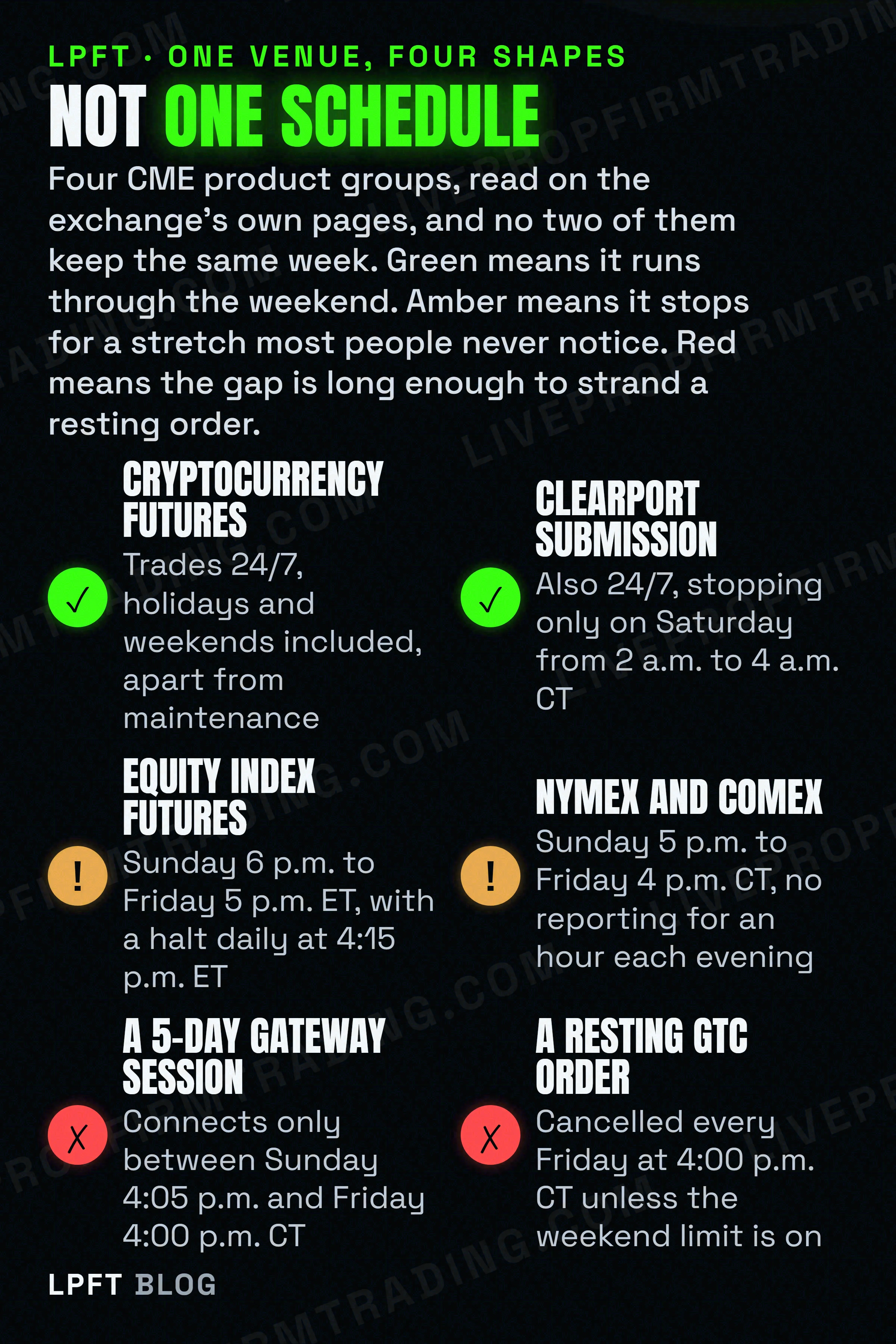
The 24-hour schedule above is written about cryptocurrency contracts. Equity index futures are a different shape entirely, and CME gives them as "Sunday - Friday 6:00 p.m. - 5:00 p.m. ET with a trading halt from 4:15 p.m. - 4:30 p.m. ET." The trade date mechanism is general, because CME says "as with CME Globex today." The weekend access is not. Never let one product group's hours stand in for another's.
When the exchange says session it means a connection, not a window
This one is almost a joke, except it causes real confusion when you read exchange documentation. In CME's own material the word session usually refers to a login. The deck has a page headed "iLink and Drop Copy Session Support," and the thing being supported is a gateway connection, not a stretch of the clock.
It is still a useful read, because the connection has hours too, and they are not the market's hours. Verbatim, about a Convenience Gateway session for a client who only trades the working week: "Existing CGW sessions support market hours between Sunday 4:05 p.m. and Friday 4:00 p.m. CT."
Sunday at 4:05 p.m. Central. The equity index market opens at 6:00 p.m. Eastern, which is 5:00 p.m. Central. So that connection window opens a clean fifty-five minutes before the contracts an index trader cares about start trading, and closes an hour before Friday's equity index close. Two different objects, both called a session, with boundaries that do not line up. When somebody tells you the session starts at a particular time, the first useful question is which of the two they mean.
The three session facts that actually break automated trading
A person notices a boundary. A script does not, which is why these three are worth writing into a rule set rather than remembering.
- Your resting orders may be cancelled every Friday afternoon, by default. On the deck's Good Till Cancel page, CME states that "Accounts default to a 5-day support schedule (zero weekend limit)" and that for the products concerned, "GTC / GTD orders for these products will be canceled every Friday at 4:00 p.m. CT." The cancellation is scoped to products designated as "7-Day Products" and is enforced at the firm level. A stop you believe is protecting you over the weekend may be a stop that was pulled on Friday, by design, under a default nobody set.
- A restart clears the book and resets the numbering. Verbatim: "During Saturday startup, client systems must clear their books and prepare for an iLink/Drop Copy/MDP 3.0 sequence number reset. Resting day orders and mass quotes are eliminated." Anything of yours that counts messages, or that assumes an order it placed is still there, is wrong on the other side of that window.
- The daily pause is short enough to miss and long enough to matter. CME notes that the expanded schedule "reduces the daily Monday through Thursday maintenance pause to just two minutes." Two minutes is below the threshold where a monitor calls an outage, and above the threshold where a reconnect loop can do something stupid. It happens every single weekday.
The published clock those boundaries sit on, including the price-limit regimes CME changes through the day, is in best times to trade futures. The overnight-against-daytime version of the question is in overnight vs regular trading hours, and what a scheduled release does to a position that is already open is in economic news and automated trades.
Session logic only exists where something sits between your decision and the broker. TradersPost publishes which broker connections it supports and states that following your own firm's rules is your responsibility, which is the right division of labour. Free 7-day trial.
See TradersPostThe session your chart shows you is a setting, and the names are borrowed
One more layer, because it is the one most traders actually look at. The session on your screen is a display choice, and your platform made it. TradingView's own support page, read on 6 November 2026, defines its three options plainly: RTH is "The standard exchange session," ETH is "Pre-market and after hours (post-market) activity," and Overnight is "Price action outside RTH and ETH, capturing the true 24 hour market." You switch between them with "the session toggle button in the bottom toolbar of the chart."
Worth noticing where those words come from. Pre-market and after-hours are equities language, and TradingView describes the 24-hour view as a feature for supported US stocks rather than for futures. The vocabulary on your futures chart was borrowed from a market that has a bell.
Practically, that toggle changes your bars. A session boundary is where a daily bar starts and ends, where a session-open indicator reads its level, and where a backtest thinks the day began. Flip it and the same rules on the same contract produce different numbers, with nothing about the market having changed. That is a settings difference wearing the costume of a result, and it is worth recording which setting a test was run on.
What to write down instead of a session table
Three things, and none of them is a list of city names. First, the trade date your broker stamps on a fill, and where to see it, because that is the day your limits reset against. Second, your own behaviour at each boundary, decided rather than inherited. What happens to an open position at the daily roll, what happens to a resting order on Friday afternoon, and whether anything of yours is allowed to act in the no-cancel window.
Third, the session setting every test was run on, written next to the result. A backtest without that note is a number you cannot reproduce, and the honest way to handle that is covered in how to backtest before automating and paper trading versus live bot testing.
If you are earlier than that, automated futures trading for beginners is the ground-up version, ES vs MES covers the contract pair most people start from, and how much it costs to trade micro futures covers what comes off the top of every round turn regardless of which session it happened in.
Futures trading carries a substantial risk of loss, and knowing the session structure does not reduce it. Nothing on this page is advice about when to trade. It is the exchange's own vocabulary for its own day, which is the part a rule set has to agree with before anything else it does can be trusted.
The LPFT Copilot runs the whole stack for you on Tradovate - start a 7-day free trial and watch it work.
Start your 7-day free trialFrequently asked questions
For futures the useful unit is not a regional session but a trade date. CME Globex changes the trade date every weekday through four named states, and CME states it verbatim: "As with CME Globex today, the trade date will change with the daily Monday-Friday Close > Pre-open > No Cancel > Open (4:00 - 4:02 p.m. CT)." The Asian, London and New York split quoted on most pages is a foreign-exchange convention and is not published by the exchange for futures.
It is the business day the exchange assigns to your trade, which is not always the calendar day you traded on. CME states that "All holiday or weekend trading from Friday evening through Sunday evening has a trade date of the following business day, with clearing, settlement and regulatory reporting processed the following business day as well." A holiday pushes it further: CME's own client deck annotates a Friday session as carrying a "Tuesday trade date due to upcoming Monday holiday." It matters because anything that resets daily resets against that date.
It is a published state in the daily roll where the exchange accepts orders but will not accept cancellations. CME prints it in the maintenance table as "No cancel: 4:01:30 p.m. to 4:02:00 p.m. CT" on weekdays, and "No cancel: 3:59:30 a.m. to 4:00:00 a.m. CT" in the longer Saturday window. Thirty seconds either way. An order resting in the book at that moment stays there until the market reopens.
Not necessarily, and the default is the part to check. In CME's client material on Good Till Cancel support for 24-hour products, "Accounts default to a 5-day support schedule (zero weekend limit)" and for the products concerned "GTC / GTD orders for these products will be canceled every Friday at 4:00 p.m. CT." CME also states that during the Saturday startup "Resting day orders and mass quotes are eliminated." Confirm with your own broker what survives the weekend on your account rather than assuming an order persists.
They are display settings on your charting platform rather than exchange objects. TradingView defines RTH as "The standard exchange session," ETH as "Pre-market and after hours (post-market) activity," and an Overnight option as "Price action outside RTH and ETH, capturing the true 24 hour market," switched with a toggle in the chart toolbar. Changing it changes where your bars open and close, so the same rules on the same contract can produce different backtest numbers. Record which setting a test used.
It depends entirely on the product group, and CME publishes a different schedule for each. Cryptocurrency futures and options are "available to trade 24/7, with the exception of maintenance windows." Equity index futures are given as "Sunday - Friday 6:00 p.m. - 5:00 p.m. ET with a trading halt from 4:15 p.m. - 4:30 p.m. ET." NYMEX and COMEX run "Sunday 5:00 p.m. - Friday 4:00 p.m. CT." There is also a Globex maintenance window every Saturday from 2:00 a.m. to 4:00 a.m. Central.
Eli Y.
Eli builds and runs rules-based automated futures systems on NinjaTrader and Tradovate, and helps traders take emotion out of the screen. He writes about futures automation, prop-firm evaluations, and the tools that connect them - plainly, and without hype.
Risk disclosure: Trading futures involves substantial risk of loss and is not suitable for everyone. This article is educational content only and is not financial advice or a recommendation to trade. Past performance is not indicative of future results. Some links are affiliate links.