
Pine Script Alerts vs Strategy Orders: Three Mechanisms, Three Different Moments

Heads up: some links below are affiliate links. If you sign up through them we may earn a commission at no extra cost to you - it never changes what we recommend.
Use alertcondition for a named item in the Condition dropdown, alert for a dynamic message your code controls, and a strategy order fill alert when the message must report what filled. Your code can see an order sent. It cannot see the fill.
The LPFT Copilot runs a rules-based system on your own Tradovate account and reports what the broker actually filled, so there is no alert mechanism to choose. Start a 7-day free trial.
Start your 7-day free trialPine Script alerts vs strategy orders: the question is which moment you need
Almost every comparison of these turns into a feature table. Dynamic messages here, dropdown entry there, pick whichever suits you. That framing hides the only fact that actually decides it, and TradingView states that fact in one sentence on its own alerts documentation.
A trade in a Pine strategy passes through three separate moments. The condition becomes true. An order is sent to the broker emulator. The emulator fills it. Those are not the same instant, they can carry different prices, and your script is only present for the first two.
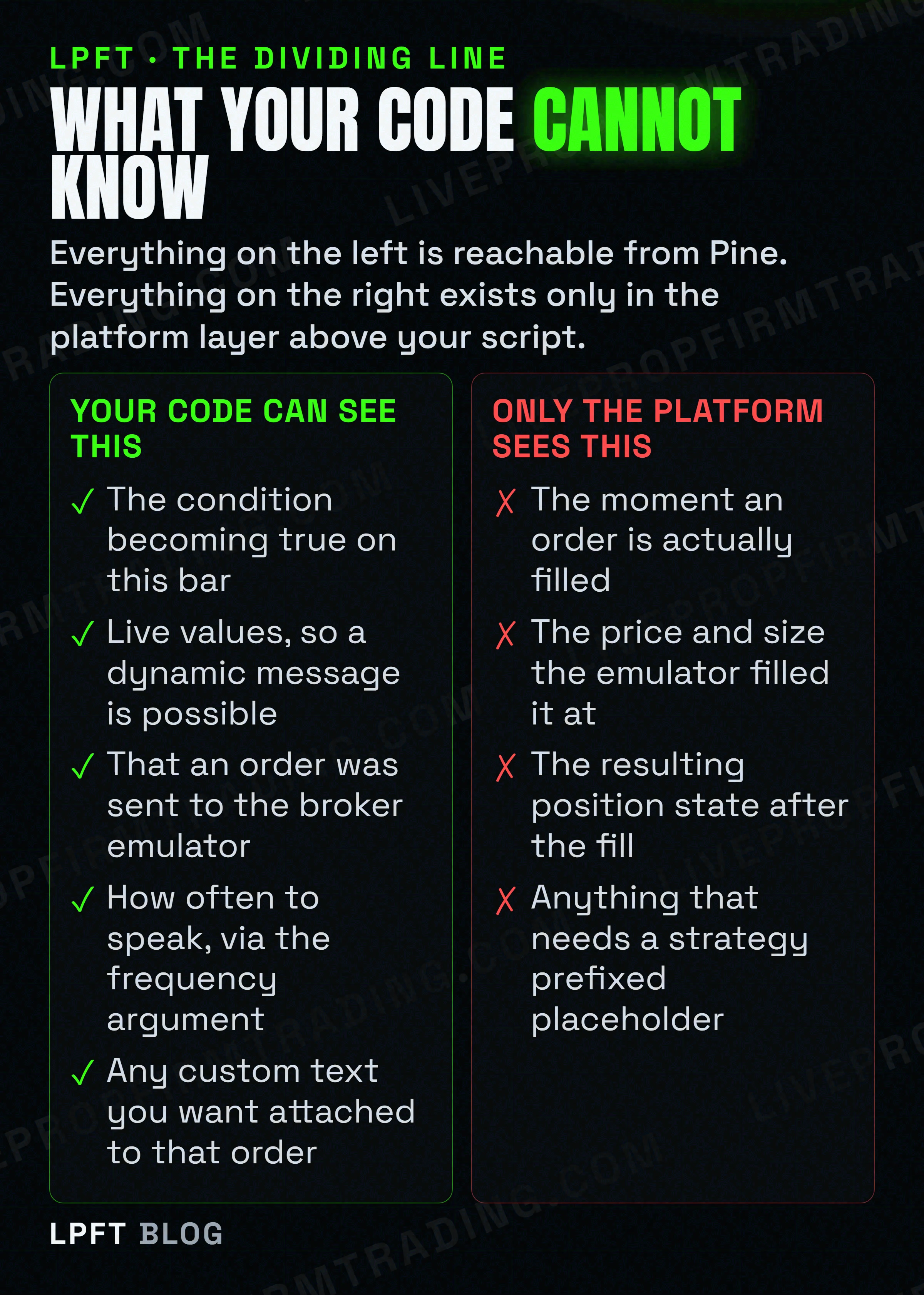
TradingView documents that while script alerts on strategies use order fill events to trigger alerts when the broker emulator fills orders, alert calls cannot be coded to trigger when orders are executed or filled, because after orders are sent to the broker emulator, the emulator controls their execution and does not report fill events back to the script directly. Read that twice. Your code can announce an intention. Only the platform can announce an outcome.
So the decision is not about taste. If the message only has to say "this happened on the chart", any mechanism works. If the message has to say "this many contracts filled at this price and the position is now long", exactly one mechanism can produce it.
alertcondition: the one that appears in the Condition dropdown
This is the oldest of the three and the most misunderstood. TradingView says alertcondition remains in Pine Script for backward compatibility, which reads like an obituary, but the same sentence gives it a job nothing else does: it can be used advantageously to generate distinct alerts available for selection as individual items in the Create Alert dialog Condition field.
That is the real reason to keep it. If you publish an indicator for other people, each alertcondition call becomes a named, selectable choice in their alert dialog. Nobody has to read your code to find out what they can be notified about. An alert driven script, by contrast, offers them one opaque entry.
The constraints are where people get hurt, and all three are documented.
- The message is fixed at compile time. The argument must be a const string, known at compilation and unable to vary bar to bar. It cannot carry a live price, a size or a direction, which is exactly why it is the wrong tool for a webhook payload.
- It has to start at column zero. Calls cannot sit inside conditional blocks, so you express the condition as the function argument rather than wrapping the call in an if.
- It does nothing inside a strategy. The presence of alertcondition calls in a strategy script will not cause a compilation error, but alerts cannot be created from them. The script compiles, no warning appears, and the alert you are waiting for was never creatable.
- It costs a plot count. A script is limited to 64 plot counts and each alertcondition call consumes one, which matters in a script that already plots heavily.
An alertcondition call inside a strategy is the quietest failure in Pine. No compile error, no warning, no entry in the Condition dropdown, and nothing in the alert log, because the alert never existed. If you converted an indicator into a strategy and your alerts disappeared, this is almost certainly why. The conversion itself is covered in turning a TradingView indicator into an automated strategy.
alert: dynamic message, and your code owns the frequency
The alert function is the newer one and TradingView is fairly direct about preferring it. Their wording is that it will generally be easier and more flexible to work with, and that contrary to alertcondition it allows for dynamic alert messages, works in both indicators and strategies, and the programmer decides on the frequency of alert events.
Dynamic messages are the headline. Because the string is built while the script runs, it can contain the current price, a computed size, a side, or anything else your logic knows at that instant. That is what makes a self assembled JSON payload possible at all from an indicator.
The frequency argument is the part that catches people, because it replaces a setting they thought they controlled. Three values are documented.
| Frequency argument | What TradingView says it does | When you want it |
|---|---|---|
| alert.freq_once_per_bar | Only the first call per realtime bar triggers the alert. This is the default value. | Most cases. One message per bar, on the first qualifying execution. |
| alert.freq_once_per_bar_close | An alert is only triggered when the realtime bar closes and an alert call is executed during that script iteration. | Anything that must not act on a forming bar. The safest option for automation. |
| alert.freq_all | All calls during the realtime bar trigger the alert. | Rarely. This is how you collect fifteen triggers in three minutes and get the alert stopped. |
TradingView states that unlike standard alert types, the triggering frequency and the specific message sent are controlled entirely by the alert function calls within the code, not by the settings in the alert dialog box. So choosing Once Per Bar Close in the dialog does nothing to an alert driven script. The four dialog options and what each one really means are in how to create a TradingView alert that triggers a trade.
And the limit, restated because it is the whole reason the third mechanism exists. An alert call inside a strategy can fire on the line where you send an order, so it can tell you an order went out. It cannot tell you the order came back, because the emulator does not report fills to the script.
Strategy order fill alerts: the only mechanism that knows a fill happened
This one is not a function. It is a checkbox in the Create Alert dialog on a strategy, and it is driven by the emulator rather than by your code. That is precisely why it can report something your code cannot see.
Because the platform is the one speaking, the message can use the strategy prefixed placeholders. The order action, the number of contracts, the execution price, the order id, the comment, the position size, and the resulting market position are all available here. That is the full description of an outcome rather than an intention.
Custom text per order, and the trap that empties your payload
You can attach your own message to a specific order using the alert_message parameter, which is available on the order generating calls. TradingView documents the catch clearly: when that parameter is used, the user must include the strategy order alert_message placeholder in the Message field of the Create Alert dialog.
TradingView states that when only the strategy order alert_message placeholder is used in the Message field, and the alert_message parameter is present in only some of the order generating calls, an empty string will replace the placeholder. So the alert fires, the request is delivered, and the body is nothing at all. The alert log shows success. A receiver will either reject it as malformed or, worse, treat it as a message it half understands. Set alert_message on every order generating call or on none of them.
What "filled" means here, which is not what it sounds like
Be precise about this, because it is where the honest limit of the whole approach sits. The fill being reported is a fill in the broker emulator, on a simulated order. TradingView states that automated strategy trading with a brokerage account is not available on TradingView yet, and that they are considering implementing it in the future. So the price in that message is the emulator's price, not a confirmation from anyone holding your money.
That matters because the emulator makes assumptions about movement inside a bar that real execution does not owe you. Why a backtest fill and a live fill diverge is argued out in why your TradingView strategy backtest lies to you. Treat an order fill alert as the best available description of your intent, not as a trade confirmation.
Why this decides your webhook payload, not just your notifications
Here is where the comparison stops being academic. If the alert is going to a bridge that places real orders, the mechanism you picked has already decided what your payload can contain.
TradingView states that placeholders with the strategy prefix can only be used in strategy alerts. Every placeholder that carries a side, a size or a position state is in that set. An indicator alert therefore cannot say which way to trade. It has to hardcode buy or sell into the message text, which means one alert per direction per symbol, each maintained separately.
The receiving end says the same thing from the other side. TradersPost documentation states that using Pine Script strategies as opposed to indicators or studies is the best way to build automated strategies that work with systems like theirs, because with a strategy you only need one alert per ticker, where an indicator route requires separate buy and sell alerts per ticker. Two independent sources, same conclusion, for the same underlying reason.
A bridge can only act on what the message contains. TradersPost treats ticker and action as required fields, and the strategy prefixed placeholders are what fill them automatically. Their own docs say no coding is required and you can paper trade free for seven days.
See TradersPost →The mechanics of getting that body across the wire, including what TradingView actually sends and why no broker accepts it directly, are in how to send a TradingView webhook to any broker.
Choosing in one pass
- Does the message need a side, a size or a position state? Then it has to be a strategy, and the strategy prefixed placeholders are only available there.
- Does it need to describe a fill rather than a decision? Then it has to be a script alert on order fill events. No function call can reach that moment.
- Does it need live values in the text? Use alert, which allows dynamic messages in both indicators and strategies.
- Are other people going to use the script? Keep alertcondition calls so they get named, selectable entries in their Condition dropdown.
- Did you choose alert? Then set the frequency in code, because the dialog setting is ignored. Prefer once per bar close for anything that places orders.
- Did you use alert_message? Put it on every order generating call, and include the placeholder in the Message field, or your body can arrive empty.
A last piece of perspective. Picking the right alert mechanism makes a chain honest about what it is reporting. It does not make the underlying idea work, and trading futures carries a substantial risk of loss regardless of how precisely your messages are worded. What this choice buys is the ability to tell a bad decision apart from a misreported one.
If the deeper question is which script type you should have written in the first place, that is Pine Script strategy versus study, and when an alert fires but nothing arrives the triage order is in TradingView alerts not firing.
Frequently asked questions
They describe different moments. Alert and alertcondition calls run inside your script, so they can report that a condition became true or that an order was sent. A script alert on order fill events is driven by the broker emulator and reports that an order actually filled. TradingView states the emulator does not report fill events back to the script, so no function call can detect a fill.
TradingView says the alert function will generally be easier and more flexible, because it allows dynamic messages, works in both indicators and strategies, and lets the programmer decide the frequency. Keep alertcondition when you want each condition to appear as a separate named item in the Create Alert dialog Condition field, which is useful for scripts other people will use.
Because it cannot. TradingView documents that while the presence of alertcondition calls in a strategy script will not cause a compilation error, alerts cannot be created from them. There is no warning and no entry in the Condition dropdown, so it looks like a bug when it is documented behaviour. Use the alert function or order fill alerts in a strategy.
If the script uses the alert function, the dialog setting does not apply. TradingView states that unlike standard alert types, the triggering frequency and the specific message sent are controlled entirely by the alert function calls within the code, not by the alert dialog settings. Set alert.freq_once_per_bar_close in the call itself.
Most likely the alert_message trap. TradingView states that when only the strategy order alert_message placeholder is used in the Message field, and the alert_message parameter is present in only some of the order generating calls, an empty string replaces the placeholder. The alert fires and delivers nothing. Set alert_message on every order generating call or on none of them.
No. The fill is a simulated fill inside the broker emulator. TradingView states that automated strategy trading with a brokerage account is not available on TradingView yet. The price in the message is the emulator price, so treat an order fill alert as an accurate description of your strategy intent rather than as a confirmation from a broker.
Eli Y.
Eli builds and runs rules-based automated futures systems on TradingView and Tradovate, and helps traders take emotion out of the screen. He writes about futures automation, prop-firm evaluations, and the tools that connect them - plainly, and without hype.
Risk disclosure: Trading futures involves substantial risk of loss and is not suitable for everyone. This article is educational content only and is not financial advice or a recommendation to trade. Past performance is not indicative of future results. Some links are affiliate links.