
How to Send a TradingView Webhook to Any Broker (No Broker Takes It Raw)

Heads up: some links below are affiliate links. If you sign up through them we may earn a commission at no extra cost to you - it never changes what we recommend.
TradingView will POST your alert to any URL you give it, but no broker API will accept that POST, because it arrives with no credential and has three seconds to be answered. Something in the middle has to hold the broker login.
The LPFT Copilot runs a rules-based system on your own Tradovate account and holds the broker session itself, so there is no bridge to rent and no token to renew. Start a 7-day free trial.
Start your 7-day free trialCan you send a TradingView webhook to a broker? Yes, and no broker will take it
The question has a clean answer and an awkward one. TradingView will send your alert to any URL you type into the webhook field, and that includes a broker API address. That half works. The other half does not, because the request that arrives looks nothing like the request a broker is waiting for.
Every result ranking for this is a relay service explaining its own dashboard, and each one treats the broker as a box that receives orders. None of them writes down what the two ends actually demand. That is a shame, because once you put the two contracts side by side the architecture explains itself and you stop guessing which part is broken.
TradingView fires one anonymous HTTP POST and then forgets about it. A broker API wants a credential that was issued minutes ago and has to be renewed on a clock, so the piece in the middle is not a convenience layer, it is the only component in the chain that can hold state.
Exactly what TradingView sends
Start with the thing most setups get wrong. The Message box in the alert dialog is not a form and it is not a note to yourself. It is the request body. Whatever you type is what lands on the far end, byte for byte, after TradingView substitutes the placeholders.
TradingView states it plainly. If the alert message is valid JSON, the request will include an application/json content-type header. Otherwise the request will use text/plain. There is no toggle. A trailing comma or a smart quote pasted from a document quietly demotes your whole payload to plain text, and a receiver that only parses JSON bodies will reject it while the alert log shows the alert fired perfectly.
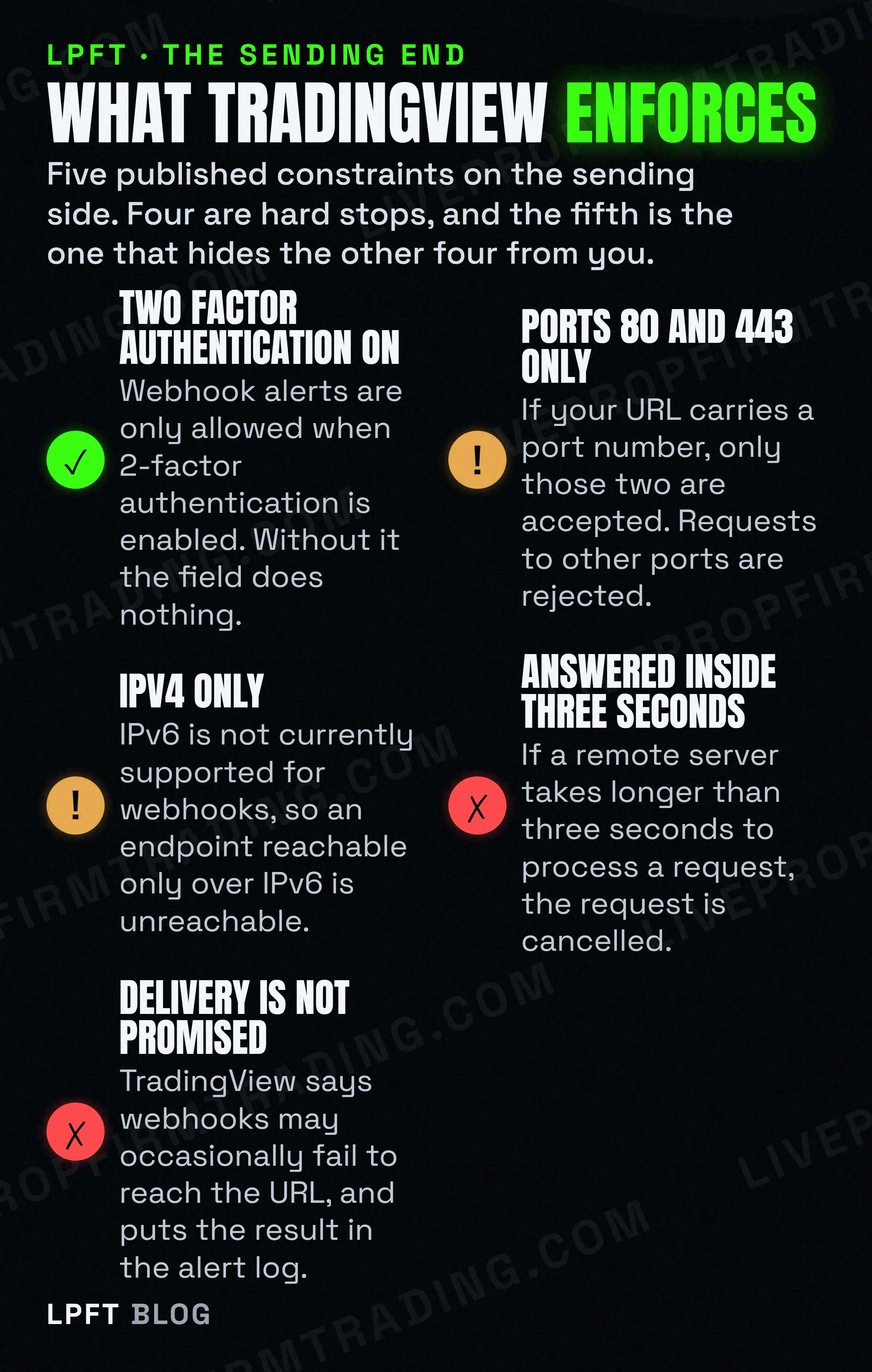
The rest of the sending end is a short list of published rules. Webhook alerts are only allowed when two factor authentication is enabled. If the URL carries a port number, only ports 80 and 443 are accepted. IPv6 is not currently supported. And the one that bites hardest in practice: if a remote server takes longer than three seconds to process a request, the request is cancelled.
That three second deadline is a design constraint, not a detail. Your receiver cannot log in to a broker, place an order, wait for an acknowledgement and answer inside it on a bad day. It has to accept the message, say yes immediately, and do the slow work afterwards. Any receiver you build or rent either works that way or fails intermittently in a way that is miserable to diagnose.
TradingView also publishes the four IP addresses its webhooks originate from, which is genuinely useful if your endpoint sits behind a firewall you control. And it admits that webhooks may occasionally fail to reach the specified URL, with the outcome shown in the Webhook status column of the alert log. That column is the first place to look when a trade is missing, and the full triage order is in TradingView alerts not firing.
One plan note, because it is the most common reason the field appears to do nothing. Webhook notifications are not on the free Basic plan. On the pricing page today the columns are Basic, Essential, Plus, Premium and Ultimate, and webhooks start at Essential. If a tutorial tells you to buy TradingView Pro for this, it was written against a plan lineup that no longer exists, which tells you how old the rest of its advice is.
There is no workaround and no trick setting. If an alert has to reach anything outside TradingView, the account has to be on a tier that includes webhook notifications. Worth confirming which tier you are on before you build a chain that assumes it.
Check TradingView plans →Exactly what a broker API demands
Now the receiving end, using Tradovate because it is a real futures broker with public developer documentation and it is the one our own stack runs on. The shape is the same at every serious broker.
You cannot place an order by sending an anonymous POST. You authenticate first, you get a token back, and you attach that token to every later request. Tradovate documents the scheme as Authorization: Bearer, and it documents the part that ends the "point the alert at the broker" idea for good.
That is Tradovate's own wording, on two separate pages of their developer site. Each token response carries an expirationTime field with the exact expiry, and you extend the session by calling renewAccessToken with the current token before it runs out. So the credential your order needs was issued recently and dies on a schedule.
Read that next to the sending end and the problem is obvious. A TradingView alert has no login step, no storage, no clock and no second request. It cannot obtain a token, it cannot keep one, and it certainly cannot renew one at 3am on a Tuesday while you are asleep. There is no configuration that fixes this, because it is not a configuration problem.
The useful part of the broker documentation is that there are separate demo and live hosts, so the whole chain can be proven against a simulated account before a real one is involved. Do that first. What simulated fills do and do not tell you is covered in paper trading versus live bot testing.
What the piece in the middle actually has to do
Once both contracts are written down, the job description of the middle piece stops being vague. It is not "a bridge". It is a server with five specific obligations.
- Be reachable the way TradingView sends. A public HTTPS URL on port 443, over IPv4, with a valid certificate.
- Answer in well under three seconds. Accept, acknowledge, queue. Never do the broker round trip inside the request.
- Hold a broker credential and renew it. This is the part no alert can do, and it is the reason the component exists at all.
- Translate the body. Your alert text has to become the exact JSON the broker endpoint expects, with the right field names and types.
- Be awake when you are not. A laptop that sleeps is a webhook receiver that drops trades, and where that code should live is argued out in do you need a VPS for automated trading.
You can write that yourself, and plenty of people do. Or you can rent it, which is what the relay services sell. TradersPost is the one we use and the one our own guides point at, so here is its contract rather than its marketing. Its endpoint shape is a POST to webhooks.traderspost.io with a UUID and a password in the path, and their docs are explicit that no coding is required and that you can paper trade for free for seven days before anything real is connected.
TradersPost receives the TradingView POST, holds the broker connection, and routes the order. Their own FAQ says it does not require coding and that Tradovate is a supported broker. Start on the paper connection, not a funded one.
See TradersPost →The payload is where most of the lost afternoons happen, so here is the field contract as their documentation states it, not as a blog post guesses it.
| Field | Required | What their docs say |
|---|---|---|
| ticker | Yes | Required with all JSON messages. The instrument symbol. For futures this is where the trap in the next section lives. |
| action | Yes | Required with all JSON messages. Allowed values are buy, sell, exit, reverse, breakeven, cancel, add and resize. |
| sentiment | No | What the state of the position should be afterwards. Allowed values are bullish or long, bearish or short, and flat. |
| quantity | No | The quantity to enter. If you omit it, the quantity is dynamically calculated or defaulted to 1, which is not the same thing as "no order". |
| signalPrice | No | The market price at the time your alert triggered. Useful for reconciliation, and not the same as the price you got filled at. |
Two practical notes on that table. A body their parser cannot read comes back as a named error, malformed-json, which is a much friendlier failure than silence. And leaving quantity out does not cancel the order, it picks a size for you, which is a surprising way to find out your sizing assumption was wrong.
The password is part of the path. Their docs note that every webhook has a password which can be regenerated with the Generate New URL button, which is the tell: anyone holding the full URL can send signals to your strategy. It gets pasted into a TradingView alert, shared in screenshots, and dropped into support threads. Treat it like an API key, never put it in a screenshot, and regenerate it the moment it has been somewhere public.
If you are weighing the rented route against the alternatives, the comparison is in TradersPost alternatives, and the plain-English version of the mechanism is in TradingView webhooks explained.
The futures seam nobody mentions: your symbol expires
This one is specific to futures and it is the single most likely reason a chain that tested perfectly stops working a few weeks later. It comes from two true statements that point in opposite directions.
TradingView says you can trade continuous contracts, the ones written with a 1! suffix, and that the order goes to the front contract, the nearest expiration currently inside that continuous series. For CME and EUREX futures, from a chart, that works. So the convenient symbol on your chart feels like the right thing to put in the message.
TradersPost documentation: do not use continuous symbols with TradersPost. They understand they are convenient, but at this time they do not reliably resolve the correct front month or second month contract behind continuous symbols. Their recommended form names an explicit contract code instead.
Neither party is wrong. They are different systems. TradingView resolves a continuous symbol because it owns that chart. The relay is a separate service receiving a string of text, and it is telling you it will not guess which month you meant. The seam is exactly where your alert message hands off.
The consequence is the sentence this whole SERP is missing. An automated futures chain carries an explicit, expiring contract code inside its alert message. That means your alert has a maintenance date, every quarter, forever. When the front month rolls, the code in that message is pointing at a contract the market has moved on from, and nothing in the stack will tell you, because from TradingView's side the alert is still firing exactly as configured.
Put it on a calendar now, in the same place you track the two month alert expiry. Two unrelated clocks, both silent, both capable of ending an automation that has no bugs in it at all.
The order to wire it in
- Turn on two factor authentication. Without it the webhook field is inert, no matter what else is correct.
- Confirm your plan tier includes webhook notifications. Basic does not. Fix this before you debug anything else.
- Stand up the receiver first, with no broker attached. Point the alert at a request-logging endpoint and read what arrives. This is where you find out whether your message is JSON or plain text.
- Check the Webhook status column, not your inbox. It separates "never triggered" from "triggered and not delivered", which are different problems.
- Connect the broker on its demo host. Prove the token, the renewal and one round trip before a funded account is in the picture.
- Name an explicit contract, not a continuous symbol. Then write down the date you will have to change it.
- Go live on one micro contract. Not your intended size. The first live order is a test of the plumbing, not of the idea.
Worth being blunt about what all of this buys you. A webhook that arrives reliably is plumbing, not an edge. Trading futures carries a substantial risk of loss whether your orders are placed by hand or by a POST request, and automating the delivery removes the hesitation, not the risk. What it does buy is the ability to tell a bad idea apart from a dropped message, which is worth more than it sounds.
And if the honest answer is that you do not want to own a server, a token renewal loop and a quarterly symbol change, that is a reasonable conclusion rather than a failure. What is and is not possible on the platform itself is laid out in can you automate trading on TradingView, and the choice between the three alert mechanisms that can start this chain is in Pine Script alerts versus strategy orders.
Frequently asked questions
TradingView will POST to any URL you give it, including a broker API address, but the broker will refuse the request. Broker APIs require an authenticated session, and Tradovate for example documents that access tokens expire after 80 minutes and must be renewed. A TradingView alert cannot log in, store a token or renew one, so a component in the middle has to do it.
Whatever you typed in the Message field, as the request body. TradingView states that if the alert message is valid JSON the request carries an application/json content-type header, and otherwise it uses text/plain. There is no setting for this, so one malformed character changes the content type and a receiver expecting JSON will reject a payload that looks fine on screen.
Check the four published constraints first. Webhook alerts need two factor authentication enabled, only ports 80 and 443 are accepted, IPv6 is not supported, and a request is cancelled if the remote server takes longer than three seconds to process it. TradingView also states that webhooks may occasionally fail to reach the URL, and shows the outcome in the Webhook status column of the alert log.
Yes. Webhook notifications are not included on the free Basic plan. The plan names on the pricing page today are Basic, Essential, Plus, Premium and Ultimate, and webhook notifications start at Essential. Any guide telling you to buy a Pro plan for webhooks predates the current lineup.
For TradersPost, their documentation states that ticker and action are required with all JSON messages. The allowed action values are buy, sell, exit, reverse, breakeven, cancel, add and resize. Quantity is optional, and if you omit it the quantity is dynamically calculated or defaulted to 1 rather than skipped.
Not through this chain. TradingView supports trading continuous contracts from a chart and routes to the front month for CME and EUREX futures, but TradersPost documentation says do not use continuous symbols with TradersPost, because they do not reliably resolve the correct front or second month behind them. An automated futures alert therefore carries an explicit contract code, which has to be updated every time the front month rolls.
Eli Y.
Eli builds and runs rules-based automated futures systems on TradingView and Tradovate, and helps traders take emotion out of the screen. He writes about futures automation, prop-firm evaluations, and the tools that connect them - plainly, and without hype.
Risk disclosure: Trading futures involves substantial risk of loss and is not suitable for everyone. This article is educational content only and is not financial advice or a recommendation to trade. Past performance is not indicative of future results. Some links are affiliate links.