
QuantVue Alternatives: It Depends Which of Its Four Products You Mean

Heads up: some links below are affiliate links. If you sign up through them we may earn a commission at no extra cost to you - it never changes what we recommend.
There is no single QuantVue alternative, because QuantVue sells four separate things: TradingView indicators, automated strategies, an alert bridge called QuantLynk, and a custom ATS platform. Match the replacement to the job you actually need, and check the refund terms, because only the cheaper tiers have one.
The LPFT Copilot is a monthly subscription with a 7-day free trial and no entry fee, running on your own Tradovate account. Try it before you spend anything bigger.
Start your 7-day free trialThe reason this search is frustrating
Search for alternatives to almost any trading tool and you get the same three kinds of page. Software directories that pad a list with products in a different category. A competitor listicle where the winner happens to be the author. And review posts that describe a version of the product that is no longer on sale.
The deeper problem is that QuantVue is not one product. Their own documentation splits it into a Pro tier of manual trading indicators with some automated strategies, an Elite tier that adds their core automated TradingView strategies, a separate alert connector called QuantLynk for pushing those tools into cash or prop accounts, and an ATS program on a custom platform. Sierra Chart tools are sold separately again and are not included in the monthly plans.
So the honest answer to what is a good alternative starts with a question back. Which of those four were you about to buy? The cheapest and the most expensive are not competitors with each other, and they do not have the same replacements.
Every figure here was read on the vendor own domain in October 2026 and is in US dollars. Tool pricing moves constantly and vendors run promotions, so treat these as a snapshot for comparison rather than a quote. Check the vendor page before you buy. We have deliberately not reprinted a single TradingView price, because their pricing page is localised by country and served us Canadian dollars.
Three jobs, and almost nobody needs all three from one vendor
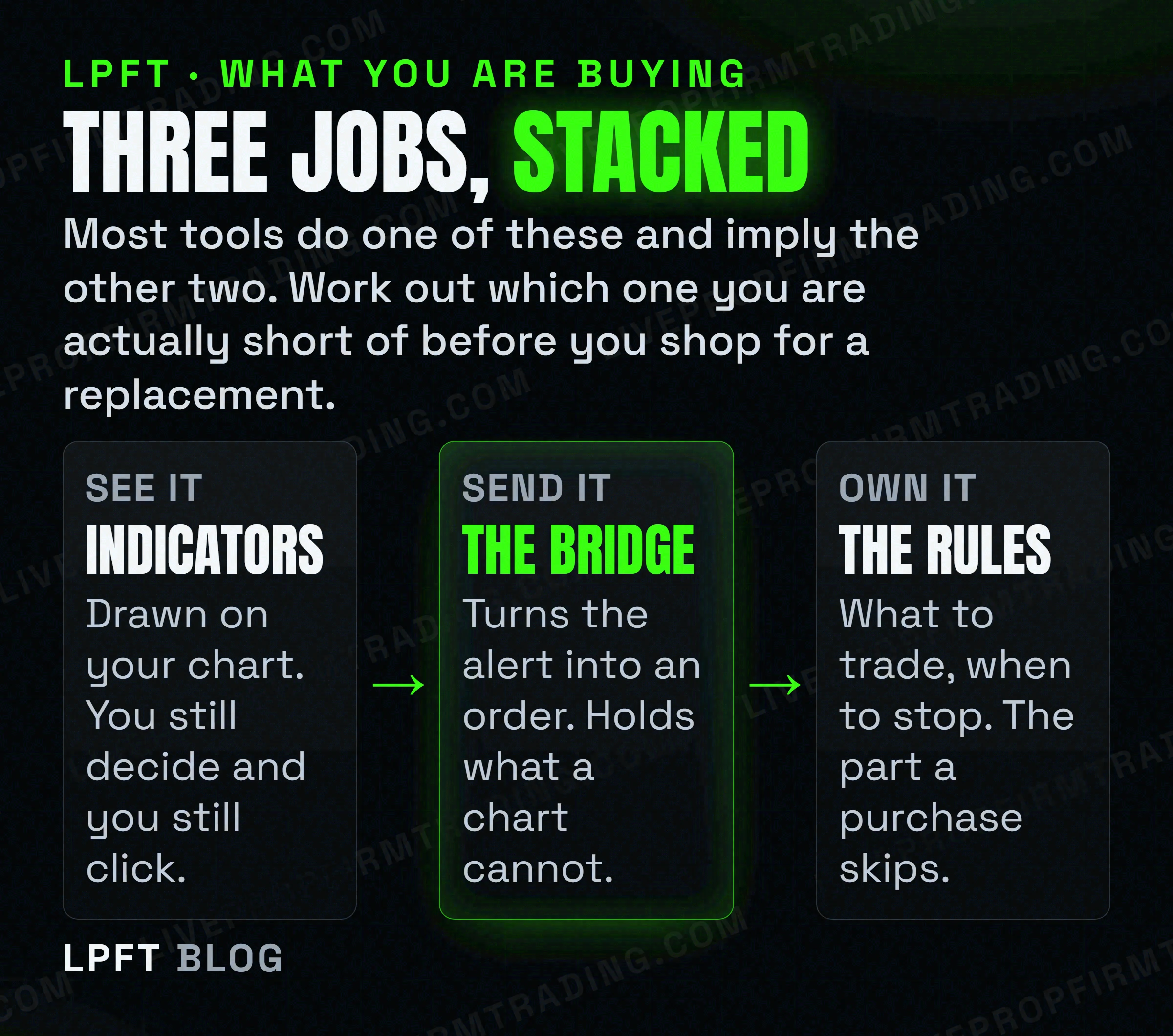
Before comparing anything, work out which layer you are short of. People routinely buy the first layer when their real problem is the third.
Layer one is seeing. Indicators draw something on your chart and can raise an alert. They do not place trades. LuxAlgo states this about its own product in plain words, that LuxAlgo does not execute trades and does not provide personalised investment advice. That sentence is true of almost every indicator suite on the market, including the expensive ones.
Layer two is sending. Something has to receive the alert, hold a broker credential, keep it renewed and submit the order. A chart cannot do this, which is covered in TradingView webhooks explained. This layer is a running subscription, forever, and people forget to include it when they compare two products.
Layer three is the rules. What to trade, how much, when to stop. No indicator gives you this and no bridge gives you this. It is the layer that decides your results and it is the one a tool purchase quietly leaves on your desk. More on why that gap is the usual cause of failure in why automated traders fail.
The ladder, with real prices
Here is the comparison the directory pages do not build. Every row was read on that vendor own site in October 2026.
| Job | Tool | Listed price | Refund or trial |
|---|---|---|---|
| Indicators | LuxAlgo | Free tier at $0. Paid monthly rates ran $24.99 to $119.99, lower billed annually. | Refund request within 30 days on your initial payment. |
| Indicators | QuantVue Pro | $197 a month or $1,497 a year. | 30-day money back, and their page states it applies to first time customers only. |
| Indicators plus their strategies | QuantVue Elite | $447 a month or $2,897 a year. | Same first-time-customer condition as Pro. |
| Alert to broker bridge | QuantLynk, by QuantVue | $99 a month or $996 a year. | 30-day window, after which their page says all sales are final. |
| Alert to broker bridge | TradersPost | $41.65 to $254.15 a month, billed yearly. Extra live accounts $10 a month each. | Paper trade free for 7 days. |
| Done-for-you platform | QuantVue ATS | $5,000, $7,000 or $12,000 one-time, plus $199 a month licensing and $25 a month data. | None. Their pricing page states sales are final and there is no trial period. |
| Done-for-you system | LPFT Copilot | $297 a month, two months free billed yearly, no entry fee. | 7-day free trial, month to month. |
Two things jump out of that table and neither is in any review we could find.
The first is the spread inside a single job. Layer one runs from a free tier to $447 a month. That is not a small difference in quality, it is a different order of magnitude, and a buyer who never saw the free tier exists has not really compared anything.
The second is the refund inversion, which is important enough to get its own section.
The expensive product is the one with no refund
You would reasonably assume that a bigger purchase comes with more protection. On this particular ladder it is the other way round.
The QuantVue Pro and Elite subscriptions carry a 30-day money back guarantee, with the qualifier printed on their own page that the 30 day money back guarantee only applies to first time customers. QuantLynk offers a 30-day window and then states that all sales are final.
The QuantVue pricing page answers the question about refunds and free trials with a flat no. Their wording is that all ATS Program sales are final and there is no trial period, with full terms in a separate ATS refund policy. The one-time fee is described as an activation fee for your tier, separate from the monthly licensing plan, and it does not unlock lifetime access on its own. We read that page twice on the same day to be sure.
That matters because the sales pages and review posts ranking for this product mostly say the opposite. The most visible claim across those results is a 30-day guarantee, presented as a reason to try it. One of the top results is a code repository whose entire description is a trial-and-discount slogan. If your decision rests on being able to get your money back, the vendor own FAQ is the only page that counts, and you should go read it yourself rather than take our word for it.
None of this says the product is bad. It says the thing most people believe about buying it is not what the vendor publishes. Those are different claims and only the second one is ours to make.
If what you want is the bridge
This is the most replaceable layer, because the job is narrow and well defined. Take an alert, authenticate to a broker, submit an order, report back.
QuantLynk is QuantVue own answer here at $99 a month or $996 a year. Their site describes a cloud alert connector and trade copier covering Tradovate, NinjaTrader, Rithmic and ProjectX enabled prop firms, with unlimited accounts on all plans. They also advertise a sub 50 millisecond execution figure, which is a vendor claim we have not timed and which you should treat as marketing rather than a measurement.
TradersPost is the bridge most TradingView users end up on. Their own docs say it does not require coding, that you can paper trade free for 7 days, and that TradingView alerts and TradersPost both work in the cloud and independently of your computer, with Tradovate supported. Listed yearly-billed rates in October 2026 ran from $41.65 to $254.15 a month.
Look at TradersPost →Which of the two is cheaper depends entirely on how many accounts you run, because one charges per account and the other does not. Work out your own number rather than trusting a headline price. A wider look at this layer is in TradersPost alternatives, and the reason the layer has to exist at all is in do you need a VPS for automated trading.
If you are pointing any of this at a funded account, read the firm first
This is where a tool comparison stops being about features. A prop firm does not care which brand you bought. It cares who built the thing and where the order came from, and the firms genuinely disagree with each other.
TradeDay lists among its prohibited practices the use of trading bots or Automated Trading Systems purchased from a third party, or multiple users using the same trading bots and ATS systems. The same page says they do not allow strategies that produce more than 200 trades in a day, prohibits using a VPN or VPS to mask the location of the trading, and states that all profits generated from prohibited trade practices will be confiscated.
Topstep goes the other way on the bot question and a different way on the hosting one. Their page says custom automated strategies and bots are allowed via the TopstepX and ProjectX API, subject to standard platform rules and their prohibition on high frequency trading. It also says all trading activity must originate from your personal device and that the use of VPS, VPNs and remote servers is prohibited by their terms of use. A private server may store data, research, backtest and log, but may not place, modify or cancel orders, and no automated trigger may reach the order endpoints. They add that orders executed via the API are final, with no review, adjustment or reversal.
No firm publishes a list of approved vendors, so any page that tells you product X is approved at firm Y has invented it. Both quotes above were read on those two firms own pages in October 2026, and both firms can change them tomorrow. Before you connect anything, open your own firm rules page, search it for the words bot, automated, third party and VPS, and decide from that. A purchased third-party system and a self-built one are treated differently at some firms, which is the single most expensive detail here.
The wider map of who allows what is in prop firms that allow automated trading, with the practical version in running a trading bot on a prop firm account and the Topstep specifics in Topstep automated trading rules.
How we would actually choose
Not a scoring matrix. Just the order the questions should come in.
- Name the layer. Indicators, bridge, or rules. If you cannot say which one you are short of, you are not ready to buy anything, and the free tiers exist for exactly this.
- Price the whole stack, not the headline. An indicator subscription plus a bridge plus a TradingView tier is three recurring bills. Add them before comparing against a single bundled price.
- Read the refund page on the vendor site. Not the review, not the comparison post, not this page. The terms differ per product within the same brand, which is the whole lesson here.
- Check your prop firm rules in writing. Specifically whether a purchased third-party system is allowed and where the order must originate. Those two sentences decide more than any feature list.
- Prefer the thing you can leave. A monthly subscription you can cancel is a smaller bet than a four or five figure entry fee that is final on purchase, independent of which is better.
- Assume the rules layer is still yours. Unless you are buying a complete system, you have bought a better view and a faster hand, not a decision.
And the part no comparison table can show you. None of these tools changes whether the underlying idea makes money. Trading futures involves substantial risk of loss, buying a more expensive tool does not reduce it, and the honest expectations are in is automated trading worth it and the trading bot myths worth dropping.
If after all that the layer you are short of is the third one, the rules, then what you are shopping for is not an indicator suite at all. That is a different comparison, and it is the one in do automated trading bots work.
Frequently asked questions
It depends which QuantVue product you mean, because they sell four. For TradingView indicators the closest comparison is LuxAlgo, which has a free tier and paid monthly rates well below QuantVue Pro at $197 a month. For the alert-to-broker bridge, QuantLynk at $99 a month competes with TradersPost at $41.65 to $254.15 a month billed yearly. For a complete done-for-you system the comparison is against subscription systems rather than against an indicator pack. Prices read in October 2026.
It depends on the product. Their Pro and Elite subscriptions list a 30-day money back guarantee with a stated condition that it applies to first time customers only. Their ATS Program does not: the QuantVue pricing page states that all ATS Program sales are final and there is no trial period, with full terms in a separate ATS refund policy. Many third-party reviews advertise a guarantee without noting that it does not cover the most expensive product.
Read on their own site in October 2026: QuantVue Pro was $197 a month or $1,497 a year, Elite was $447 a month or $2,897 a year, and the QuantLynk bridge was $99 a month or $996 a year. The ATS Program was listed at $5,000, $7,000 or $12,000 as a one-time activation fee by tier, plus $199 a month licensing and $25 a month for external data. An older page on the same site still showed the ATS Program at $7,500 a year, so check the current page before buying.
No. QuantLynk is the separate alert connector that automates QuantVue tools into cash or prop accounts, sold on its own site and billed separately at $99 a month or $996 a year. QuantVue Pro and Elite are the indicator and strategy subscriptions. Buying the indicators does not include the bridge, which is a common and expensive misreading of the pricing.
Check your own firm rules, because the firms disagree. TradeDay prohibits trading bots or Automated Trading Systems purchased from a third party and confiscates profits from prohibited practices. Topstep allows custom automated strategies and bots via the TopstepX and ProjectX API but requires all trading activity to originate from your personal device and prohibits VPS, VPNs and remote servers. No firm publishes an approved vendor list, so any page claiming a specific product is approved somewhere has made that up.
Generally no, and reputable vendors say so. LuxAlgo states plainly that it does not execute trades and does not provide personalised investment advice. An indicator draws on your chart and can raise an alert. Turning that alert into a broker order needs a separate bridge service that holds your broker credentials, which is a second subscription most buyers do not budget for.
Eli Y.
Eli builds and runs rules-based automated futures systems on TradingView and Tradovate, and helps traders take emotion out of the screen. He writes about futures automation, prop-firm evaluations, and the tools that connect them - plainly, and without hype.
Risk disclosure: Trading futures involves substantial risk of loss and is not suitable for everyone. This article is educational content only and is not financial advice or a recommendation to trade. Past performance is not indicative of future results. Some links are affiliate links.