
Can TradingView Place Trades Itself? Yes, But It Never Presses the Button

Heads up: some links below are affiliate links. If you sign up through them we may earn a commission at no extra cost to you - it never changes what we recommend.
Yes for an order you place yourself, no for one you want placed for you. TradingView states that it does not process your trades and acts as an interface only, and that strategy trading is limited to the backtesting mode. A third party has to close that gap.
The LPFT Copilot runs a tested, rules-based method on your own Tradovate account, with no bridge for you to wire up and nothing for you to host. Start a 7-day free trial.
Start your 7-day free trialThe short answer has two halves, and most pages give you one
Search this question and you get a flat no followed by a product pitch. That is wrong in a way that matters, because TradingView absolutely can put a live order in front of your broker. Thousands of people trade futures that way every session.
The precise line is not between analysis and execution. It is between an order a person placed and an order nothing placed. TradingView puts its own position in one sentence on its own help pages: it does not process your trades and acts as an interface only.
Your broker holds the account, takes the order, fills it and owns the record. TradingView is the keyboard. That is why the answer to this question changes depending on whose finger is on the key, and why "TradingView cannot place trades" is not a true statement about the platform.
So the honest answer is two sentences. It will send an order you place. It will not decide to place one.
What it does place: an order you made yourself
Connecting a broker is a first-class feature rather than a workaround. TradingView documents the entry point as clicking the Trade button in the top toolbar of Supercharts, and states that you can connect multiple top brokers and crypto exchanges right from Supercharts and use all the platform's capabilities.
Once a broker is attached, the order can leave from several places, and they are all the same kind of order. The order ticket, where you type quantity and attach a stop or a target. Chart trading, where you act directly on the price scale. Keyboard shortcuts. Depth of market for the people who want the ladder. Different surfaces, one broker, one real fill.
For futures specifically this is not theoretical. Tradovate is a connected broker on TradingView, announced on TradingView's own blog and carrying its own broker page there, which is why the combination turns up constantly in prop-firm setups. Real-time futures data still has to be subscribed on the broker side, so check that before you assume a symbol will be tradable.
There is also a practice route that costs nothing and is worth using first. TradingView offers Paper Trading, which they describe as specifically designed to help you develop and refine your trading strategy before moving to real-money trading. It behaves like the real panel and puts nothing at stake, and the honest limits of any simulator are covered in paper trading versus live bot testing.
What it will not place: anything a script decided
This is the half that people are usually really asking about, and TradingView answers it without hedging.
On the question of autotrading a Pine Script strategy, their support page states that strategy trading is limited to the backtesting mode only, that automated strategy trading with a brokerage account is not available on TradingView yet, and that they are considering implementing this in the future. A second page on the same question, read the same day, adds that they cannot provide any estimated time of arrival.
Both of those sentences were read on TradingView's own domain on 30 September 2026. They are a roadmap statement, not a law of physics, and a roadmap statement is exactly the kind of thing that changes without a press release. If you are reading this much later, check those pages yourself before you buy anything to work around them.
The consequence is specific and it catches people who have already done the hard part. Your strategy can be written, backtested, cleaned of lookahead and honest about its fills, and the orders in the Strategy Tester are still simulated. Every one of them. The tester exists to score a hypothesis, and TradingView has never claimed otherwise. Whether those simulated numbers even mean anything is a separate audit, covered in TradingView backtest repainting.
An alert is the other thing people mistake for execution. An alert notifies. It does not execute, and nothing about attaching a broker to your chart changes that.
So where does the click actually come from
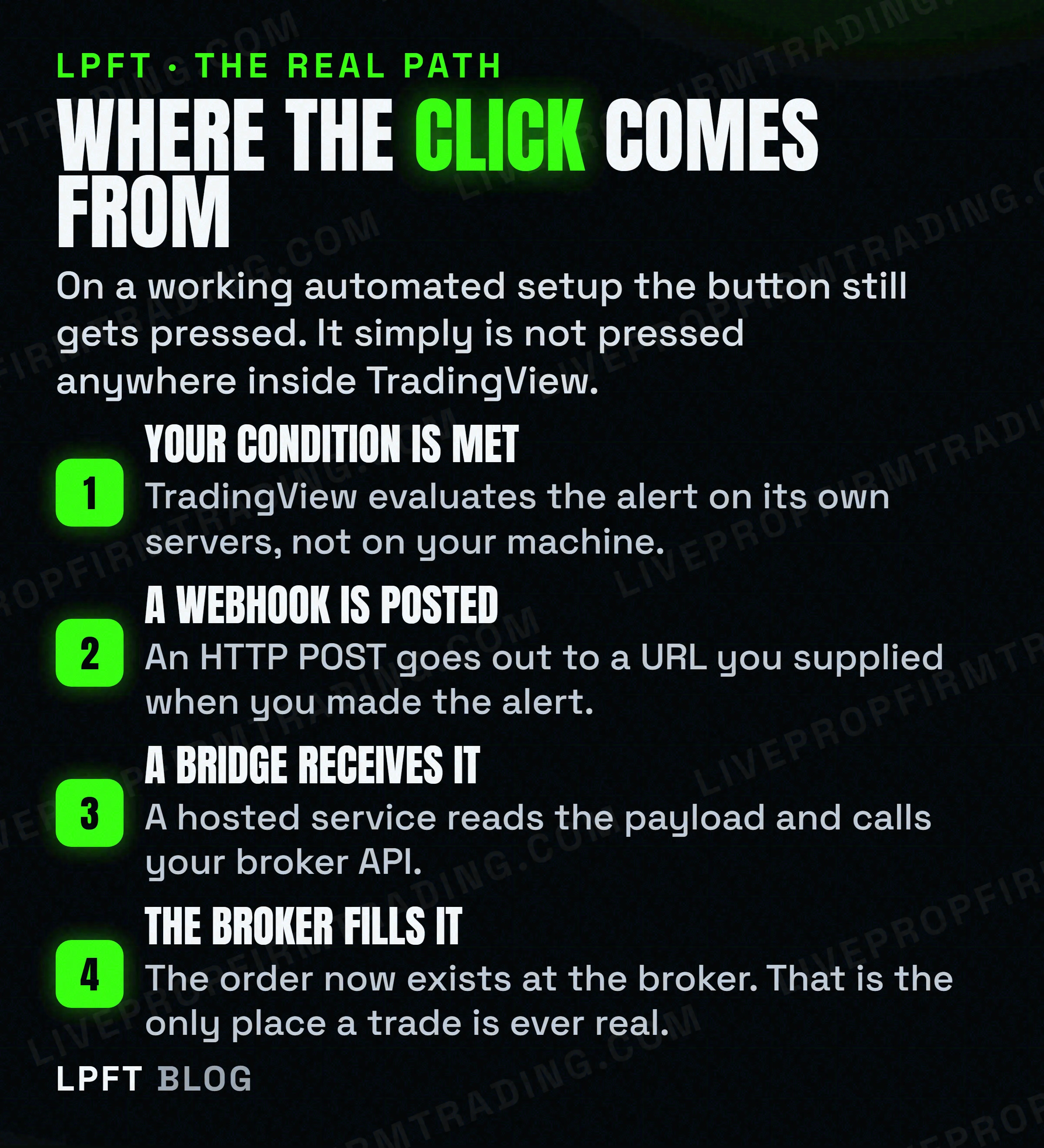
A webhook alert is the bridge between the two halves. When the condition triggers, TradingView sends an HTTP POST to a URL you provide, and something at that URL has the broker credentials and places the order. That something is the finger on the key.
TradingView publishes the constraints on that hand-off, and they are worth knowing before you trust it with money. Webhook alerts are only allowed when two-factor authentication is enabled. Only ports 80 and 443 are accepted and requests to other ports are rejected. If a remote server takes longer than three seconds to process a request, the request is cancelled. IPv6 is not currently supported. Four fixed originating IP addresses are published so you can allow them.
And the admission that should shape your expectations more than any of the above, in their words: webhooks may occasionally fail to reach the specified URL. Delivery is visible in the alert log under a webhook status column, which means a missed trade is findable after the fact but is not prevented.
The full mechanics of that hop, including what to put in the payload, are in TradingView webhooks explained and how to turn TradingView alerts into real automated trades. The broker-side version for futures is in auto-executing a TradingView strategy at a futures broker.
TradersPost is a cloud service that receives the TradingView webhook server-side and routes the order to a broker, with Tradovate explicitly supported. It describes itself as hosted in a shared cloud environment and working independently of your computer, which is also why most people asking this question do not need a server of their own. There is a free 7-day trial.
See TradersPost →Since nothing of yours sits in that path, the usual follow-up question answers itself. The long version is in do you need a VPS for automated trading.
The timing trap that survives a working setup
Suppose you wire all of this correctly. There is one more thing standing between you and the trade you thought you were getting, and it is a dropdown in the alert dialog rather than anything in your code.
TradingView offers four triggering frequencies, and only one of them waits for the bar to finish.
| Setting | What TradingView says it does | Can it fire mid-bar |
|---|---|---|
| Once only | An alert is triggered only once, and the conditions have to match the exact parameters you set. | Yes |
| Once per bar | The system checks every bar and triggers whenever conditions are met, no more than once per bar. | Yes |
| Once per bar close | The same as once per bar, but the bar needs to close for an alert to be triggered. | No |
| Once per minute or every time | The system checks conditions every minute and triggers whenever conditions are met. | Yes |
Read the right-hand column again. On three of the four, a condition that is true halfway through a bar and false by the close will still have sent the order. That is not a bug in the bridge and it will not show up in a backtest, because the backtest was run on closes. The setting detail is unpacked in the TradingView alert that triggers a trade.
There is a second one that is worse, because it fails silently and slowly. TradingView states that alerts have an expiration period after which they automatically stop, and that the maximum lifetime of a standard alert is two months, with an open-ended option available on Premium and Ultimate plans. On the lower tiers the alert driving your automation dies on its own inside two months, and nothing rings. The state is visible in the alert list, which is the only reason anyone ever finds it. More on that habit in what set and forget actually costs.
How to answer this for your own setup in five minutes
- Decide who you want pressing the button. If the answer is you, connect a broker and stop reading. TradingView already does this and it costs nothing extra.
- If the answer is nobody, accept that you need a third party. Strategy autotrading is not available on TradingView, by their own statement. No setting unlocks it.
- Check your plan carries webhooks. They start at the Essential tier. The free Basic plan does not include them, and two-factor authentication has to be on.
- Set the alert frequency deliberately. Once per bar close is the only option that waits for the bar. Choose the others on purpose or not at all.
- Put a reminder in your calendar for the alert expiry. Two months on a standard alert, and nothing warns you.
- Check your firm before automating anything on a funded account. Firms differ enormously on this and some prohibit it outright.
That last one is not a footnote. Whether automation is allowed at all depends entirely on whose account it is, and the rules are specific enough that reading a review site about them is worthless. Start with which prop firms actually allow automated trading and then read your own firm's current page.
And the framing worth keeping through all of it: trading futures involves substantial risk of loss. Getting an order to fire automatically is an engineering result, not a trading result. The wider version of this question, including what is worth automating in the first place, is in can you automate trading on TradingView.
Frequently asked questions
It can place an order you make, and it cannot decide to place one. TradingView states that it does not process your trades and acts as an interface only, so a broker you connect executes the order while TradingView provides the controls. For a strategy to trade without you, a third-party service has to receive the alert and call the broker.
No. Their support page states that strategy trading is limited to the backtesting mode only, that automated strategy trading with a brokerage account is not available on TradingView yet, and that they are considering implementing it in the future without providing an estimated time of arrival. Those pages were read on 30 September 2026.
Yes, through a connected broker. Tradovate is one of the futures brokers integrated with TradingView, announced on TradingView's own blog and listed with its own broker page there. Note that real-time futures data has to be subscribed on the broker side before a symbol becomes tradable.
An alert notifies, it does not execute. A webhook alert sends an HTTP POST to a URL you provide, and whatever sits at that URL is what actually places the order. TradingView also notes that webhooks may occasionally fail to reach the specified URL, with delivery shown in the alert log webhook status column.
Webhook notifications start at the Essential plan and are not included on the free Basic plan. TradingView also requires two-factor authentication to be enabled before webhook alerts are allowed, accepts only ports 80 and 443, and cancels a request if the remote server takes longer than three seconds to respond.
Yes, on three of the four frequency settings. TradingView describes Once per bar close as the same as once per bar except that the bar needs to close for the alert to be triggered. Once only, Once per bar and Once per minute or every time can all trigger on a bar that is still forming.
Eli Y.
Eli builds and runs rules-based automated futures systems on TradingView and Tradovate, and helps traders take emotion out of the screen. He writes about futures automation, prop-firm evaluations, and the tools that connect them - plainly, and without hype.
Risk disclosure: Trading futures involves substantial risk of loss and is not suitable for everyone. This article is educational content only and is not financial advice or a recommendation to trade. Past performance is not indicative of future results. Some links are affiliate links.