
TradersPost vs a Done-for-You System: You Are Comparing a Pipe to a Plan

Heads up: some links below are affiliate links. If you sign up through them we may earn a commission at no extra cost to you - it never changes what we recommend.
They are not competitors. TradersPost is a bridge that routes a signal you already own to a broker, and its own FAQ says you connect strategies other traders published on TradingView. A done-for-you system supplies the decision itself. Buying the bridge leaves the decision with you.
The LPFT Copilot is a monthly subscription with a 7-day free trial and no entry fee, running a rules-based method on your own prop firm or Tradovate account.
Start your 7-day free trialWhy this search returns nothing useful
We went looking for the page that answers this and it does not exist. The results are TradersPost own blog comparing itself to writing your own code, then a run of alternatives listicles, then a Wikipedia article about trading strategies in general, then review sites scoring features.
Every one of those answers a different question. None of them draws the line this search is actually asking about, which is simpler and more expensive than any feature table. Does the thing you are about to pay for decide the trade, or does it only deliver a decision you have to bring yourself?
That line is not a matter of opinion and you do not need a review to find it. It is printed on the vendor own pages, and we read them to write this.
Every sentence in quotation marks below was read on the named party own domain in October 2026, and prices are in the currency their page displayed. Tool pricing and prop-firm rules both move constantly, so treat these as a dated snapshot and open the vendor page before you buy. Where we could not read a page ourselves, we say so instead of filling the gap.
What TradersPost says it is, in its own words
TradersPost is a cloud service that receives an alert and submits an order to a broker. Their docs are clear and unglamorous about the job, which is to their credit, and three of their own sentences settle this whole comparison.
On coding, their FAQ says plainly that TradersPost does not require coding. On hosting, it says TradingView alerts and TradersPost both work in the cloud and independently of your computer. On brokers, it says TradersPost currently integrates with brokers like TradeStation and Tradovate. Those are useful, honest claims and they are the reason people end up on the product.
Then there is the sentence that answers this search. Their FAQ says you can easily connect strategies to TradersPost that other traders have created and published on TradingView. Read that again, because it is the product describing where the decision comes from, and the answer is somebody else.
Routing somebody else signal is the job TradersPost advertises, and it does that job in the cloud for a published price. The mistake is not buying it. The mistake is buying it while believing you bought a trading system, then discovering months later that the only thing missing was the part that decides anything.
There is one more detail worth knowing before you paste anything. Their webhook URL carries its own password in the path, and their docs say every webhook has a password that can be regenerated by clicking the Generate New URL button. In other words the URL is the credential, and it gets typed into a TradingView alert field. Treat it like a key, because it is one. The mechanics of that handoff are in TradingView webhooks explained.
The layer a bridge cannot sell you
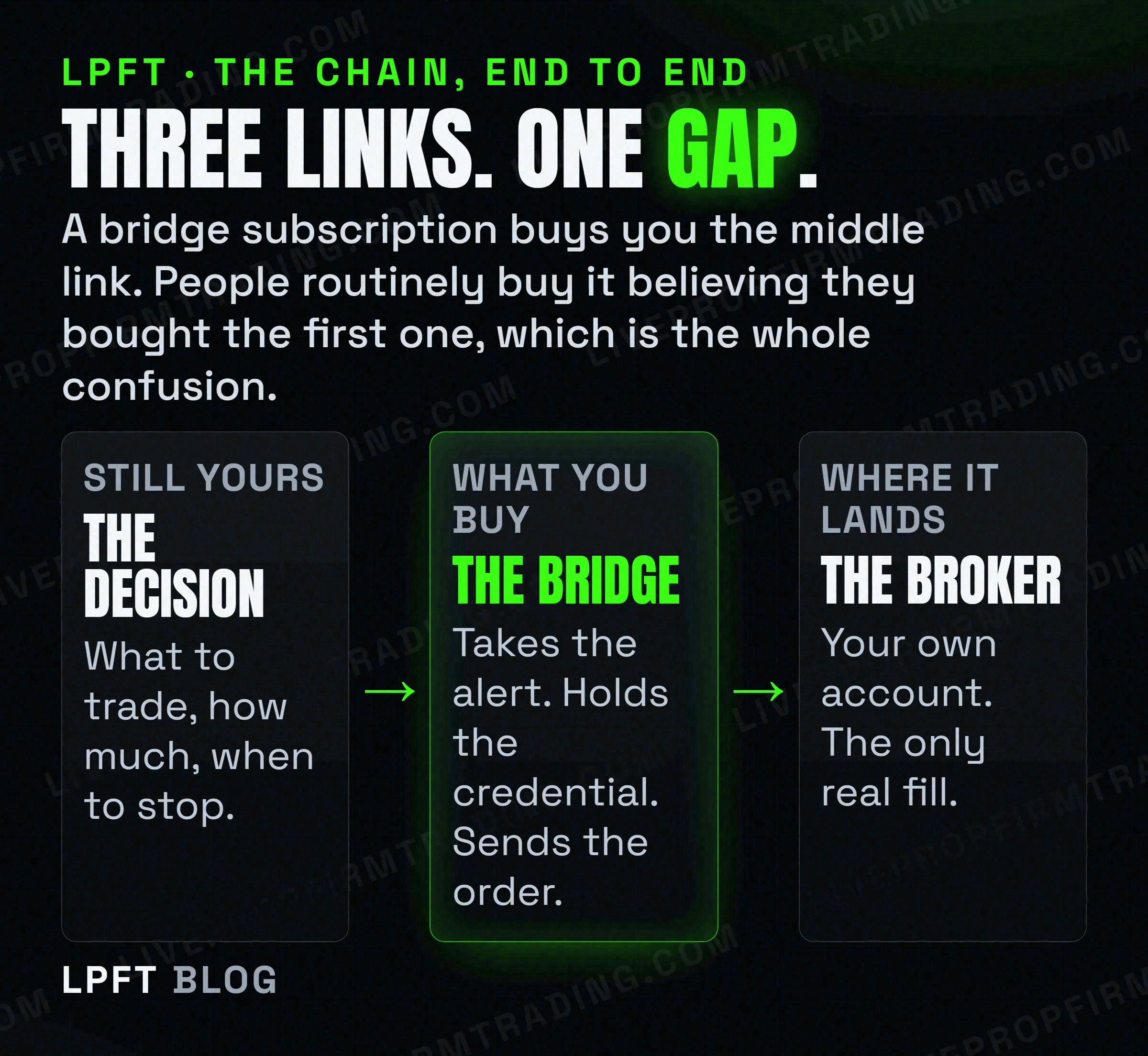
A done-for-you system is supposed to own the right-hand column. What to trade, how much, when to stop for the day, and a method that was tested before it was sold. Whether any given vendor genuinely delivers that is a separate question, and the way to vet one is in do automated trading bots work.
The honest framing is that these two things sit in series, not in parallel. A system still needs something to carry its orders to a broker, and a bridge still needs something to tell it what to do. You are never choosing one instead of the other. You are choosing how many of the two layers you are paying somebody else to own.
This is also why the comparison trips people up on price. A bridge subscription looks cheap next to a full system until you remember it is one of three recurring bills, alongside a charting plan and whatever supplies the signal. Add them before you compare anything.
TradersPost is the bridge most TradingView users end up on, and the one we point people at when the signal is already sorted. Their own docs say it does not require coding, that you can paper trade for free for 7 days, and that Tradovate is supported. Yearly-billed rates read in October 2026 ran from $41.65 to $254.15 a month.
Look at TradersPost →The price comparison nobody assembles
Here is the arithmetic, with every figure read on that vendor own site in October 2026. The bridge rates are the yearly-billed monthly equivalent, which is the only number their pricing page publishes, so we have labelled it rather than quietly presenting it as a month-to-month price.
| What you are buying | Product | Listed price | What it leaves you |
|---|---|---|---|
| Delivery only | TradersPost Starter | $41.65 a month billed yearly. 1 live account, 4 paper. Extra live accounts $10 a month each. | The signal and the rules. |
| Delivery only | TradersPost Basic | $84.15 a month billed yearly, marked most popular. 2 live accounts, 6 paper. | The signal and the rules. |
| Delivery only | TradersPost Premium | $254.15 a month billed yearly. 6 live accounts, 10 paper. | The signal and the rules. |
| Delivery and the rules | LPFT Copilot | $297 a month, two months free billed yearly, no entry fee. | Your own broker account, funded and monitored. |
Two things fall out of that table. The first is that the gap between the top bridge tier and a complete system is smaller than most people assume, because the bridge tiers scale on account count rather than on capability. If you run one account the cheap tier is genuinely cheap. If you run six, the comparison changes shape entirely.
The second is that the bridge row never fills in the right-hand column at any price. Premium does not include a strategy. It includes more accounts to send a strategy to. That is the whole point of this article and it is the thing a feature table hides.
A wider look at that layer, including the competitors, is in TradersPost alternatives. The adjacent ladder with indicator suites priced on it is in QuantVue alternatives.
The three clocks neither option removes
This is the part that is missing from every page on this topic, and it is the most useful thing we can tell you. An automated futures setup contains at least three things that expire on their own schedule, and none of them announces itself when it stops. A subscription to either kind of product does not change that. It only changes who is watching.
Two months, for the alert
TradingView own support pages say the maximum lifetime of a standard alert is two months, and that an open-ended option is available on their Premium and Ultimate plans. On the lower tiers the alert driving your automation dies by itself inside two months, and the alert list shows a named Stopped status rather than sending you a warning. The diagnosis is in TradingView alerts not firing.
Eighty minutes, for the broker
On the broker end, Tradovate own developer documentation says access tokens expire after 80 minutes, and that you renew by calling renewAccessToken with your current token before it expires. A TradingView alert sends one request and then forgets about it. Nothing inside an alert can obtain, hold or renew a credential on a clock, which is the structural reason a middle layer has to exist at all rather than being a convenience.
Every quarter, for the symbol
TradersPost own futures documentation says plainly not to use continuous symbols with TradersPost, because at this time they do not reliably resolve the correct front month or second month contract behind them. TradingView, meanwhile, will happily put a continuous symbol into your alert message because on a TradingView chart that symbol resolves. So an automated futures chain ends up carrying an explicit, expiring contract code, and that gives your alert a quarterly maintenance date.
Both options have the same three clocks, because both sit on the same infrastructure. What differs is who notices when one of them runs out. If you buy delivery only, all three are yours to monitor forever. That is a standing job, not a setup step, and it is the most common reason a working setup quietly stops working. More on that in set and forget trading expectations.
If any of this is pointing at a funded account, read the firm first
Here the comparison stops being about features, because a prop firm does not care which brand you bought. It cares who built the thing and where the order came from, and the firms genuinely disagree with each other. Both quotes below were read on those firms own pages in October 2026.
TradeDay states that to use an automated trading system you must use one of the platforms they support, naming NinjaTrader, Tradovate, TradingView, Jigsaw and Quantower. The same page says algos and bots purchased from a third party and employed by the trader are forbidden, and warns that if multiple users execute identical trades, related accounts are suspended and users banned.
Topstep goes the other way on the bot question. Their page says custom automated strategies and bots are allowed via the TopstepX and ProjectX API, subject to standard platform rules and their prohibition on high-frequency trading. It also says all trading activity must originate from your personal device, and that the use of VPS, VPNs and remote servers is prohibited by their terms of use. A private server may store data, research, backtest and log, but may not place, modify or cancel orders, and no automated trigger may reach the order endpoints. They add that orders executed via the API are final, with no review, adjustment or reversal.
One firm names a purchased third-party system as forbidden. The other allows a bot through its own API but requires the order to originate from your personal device. A single product can therefore be fine at one firm and a terminable breach at the other, and no firm publishes a list of approved vendors, so any page telling you product X is approved at firm Y has invented it. Open your own firm rules page, search it for the words bot, automated, third party and VPS, and decide from that.
The wider map is in prop firms that allow automated trading, the practical version is in running a trading bot on a prop firm account, and the Topstep specifics are in Topstep automated trading rules. LPFT only supports prop-firm connections that run through Tradovate, and not every firm exposes that API, so always check yours first.
How we would actually decide
Not a scoring matrix. Just the order the questions should come in.
- Say out loud which layer you are short of. If you have a tested method and only need it delivered, you want a bridge and you should stop reading comparison posts. If you do not have the method, a bridge cannot sell you one.
- Price the whole stack. A charting plan plus a bridge plus whatever supplies the signal is three recurring bills. Add them before comparing against one bundled price, and count accounts, because that is what the bridge tiers scale on.
- Ask who watches the three clocks. Alert expiry, broker token, contract code. If the answer is you, that is a permanent job and you should want it in writing that you understood it.
- Read your prop firm rules yourself, in writing. Specifically whether a purchased third-party system is allowed and where the order must originate. Those two sentences decide more than any feature list.
- Prefer the thing you can leave. A monthly subscription you can cancel is a smaller bet than a large one-time fee, independent of which product is better.
- Test it on paper before it touches money. Both options support this and both are worth the delay. The method is in paper trading versus live bot testing.
And the part no comparison can show you. Neither purchase changes whether the underlying idea works. Trading futures involves substantial risk of loss, automation removes emotion rather than risk, and a more expensive subscription does not reduce either. The honest expectations are in is automated trading worth it and why automated traders fail.
Frequently asked questions
No. TradersPost is an execution bridge. It receives an alert and submits an order to a connected broker, and its own FAQ says you can connect strategies that other traders have created and published on TradingView. It does not supply the trading decision, the position size or the stop rules. A done-for-you system is the layer that supplies those, and the two sit in series rather than competing.
Not its own. Their documentation positions the product as the thing that routes a signal from a source such as TradingView or TrendSpider to your broker, and points users at strategies other traders have published. So the decision arrives from outside the product. That matters because the quality of your results is set by the layer TradersPost does not sell.
Read on their own pricing page in October 2026: a 7-day trial at no cost, then Starter $41.65, Basic $84.15, Pro $169.15 and Premium $254.15 per month, every tier billed yearly. Extra live accounts were $10 a month each and extra paper accounts $5 a month each. The tiers differ mainly by how many accounts you may connect, not by capability, and the month-to-month sticker price is not published on that page.
You need something to send the alert, and if that something is TradingView then webhook notifications are not included on their free Basic plan. They start at the Essential tier. That is a second recurring bill most comparisons leave out, alongside whatever supplies the signal itself, so price the whole stack rather than the bridge alone.
Check your own firm rules, because the firms disagree and the answer is theirs rather than the vendor. TradeDay states that an automated trading system must run on one of their supported platforms and that algos and bots purchased from a third party are forbidden. Topstep allows custom automated strategies via its own API but requires all trading activity to originate from your personal device and prohibits VPS, VPNs and remote servers. No firm publishes an approved vendor list, so treat any page claiming a specific product is approved as invented.
Usually a clock rather than the code. TradingView says the maximum lifetime of a standard alert is two months on the lower plans. Tradovate says API access tokens expire after 80 minutes and must be renewed before expiry. TradersPost says not to use continuous futures symbols, which means your alert carries an explicit contract code that changes every quarter. None of the three warns you when it runs out.
Eli Y.
Eli builds and runs rules-based automated futures systems on NinjaTrader and Tradovate, and helps traders take emotion out of the screen. He writes about futures automation, prop-firm evaluations, and the tools that connect them - plainly, and without hype.
Risk disclosure: Trading futures involves substantial risk of loss and is not suitable for everyone. This article is educational content only and is not financial advice or a recommendation to trade. Past performance is not indicative of future results. Some links are affiliate links.